If you’ve ever grabbed your trusty handheld cooling fan to beat the summer heat, only to hear a weird grinding, rattling, or high-pitched whine out of it, you know how frustrating that can be. As someone who’s spent the last five years working in handheld cooling fan supply—helping customers of all kinds, from students dorms to outdoor event planners, get reliable, consistent airflow—I’ve fielded more of these “my fan is making a strange noise” calls than I can count. The good news? Most of the time, you don’t need to be an engineer to fix it. I’ve put together this step-by-step troubleshooting guide, drawn from real customer cases and hands-on testing, to walk you through every easy check before you even think about tossing that fan or buying a new one. Handheld Cooling Fan
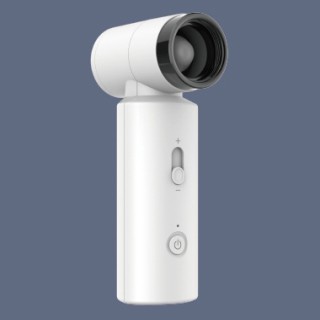
First, let’s start with the simplest, most overlooked issue: debris stuck in the fan blades. This is by far the number one cause of unusual noise in handheld fans, especially the ones people use daily. Think about where your fan lives: on your desk, in your car cup holder, on a picnic blanket by the park. Dust bunnies, crumbs, pet hair, even tiny grass clippings or sand can sneak into the grille and wrap around the spinning blades. When that happens, the blades can’t rotate evenly, so they bump against the inside of the fan housing every time they spin—making that rattling or scraping noise that’s hard to miss. Last summer, a college customer reached out saying their desk fan had started making a loud, irregular clunk; when I walked them through taking the grille off, they found a crumpled granola wrapper edge wedged between one blade and the housing. That was a 10-second fix, no tools needed.
So, how do you check for debris? First, unplug the fan and remove any batteries if it’s cordless—safety first, always. Most handheld fans have a plastic grille on the front that twists off easily; turn it counterclockwise a quarter turn and pull it straight off, no screwdriver required for most models we supply. Once the grille is off, gently spin the blades by hand (never put your finger near the spinning blades when it’s plugged in!) to feel or see if anything is caught. Use a soft, dry toothbrush or a can of compressed air (held upright, so you don’t spray propellant liquid) to dislodge any dust, hair, or tiny particles. For hair wrapped tightly around the center spindle, a pair of clean tweezers works perfectly—just pull slowly so you don’t bend the blades, which can cause more noise later. After cleaning, reattach the grille, plug it back in, and test it. If the noise is gone, great! If not, move to the next step.
Next up, and still super common, is loose internal components. Handheld fans are small and built to be portable, so all the tiny parts have to fit tightly in a tight space. When they’re jostled—dropped in a bag, knocked off a table, stuffed under a car seat—screws, the motor housing, or even the blade assembly can come loose, leading to a rattling or vibrating noise that feels like something is shifting inside. I remember a customer who’d dropped her fan while hiking, and afterward it had a constant high-pitched rattle; when I had her unscrew the back panel (most models have two small Phillips-head screws here, included in the basic tool kit we send with every fan), she found the blade hub had worked loose from the motor shaft. Tightening that tiny screw (we always add a spare in case you lose one) fixed the noise right away.
To check for loose parts: again, make sure the fan is completely powered off. Flip it over and remove the back panel. Gently hold the blade assembly steady with one hand, and use a small Phillips screwdriver to tighten any visible screws—don’t over-tighten, that can strip the plastic or crack parts, just snug enough. While you’re in there, give the blade assembly a little wiggle: if it moves more than a tiny bit, that’s a sign it’s loose on the motor shaft, which is a quick fix. If the motor itself feels loose in its housing, gently press it back into place and tighten the screws holding the motor mount. Once you’re done, replace the back panel, test the fan, and see if the noise is gone. A quick note here: if your fan is still under warranty, be careful when removing panels—some warranty policies can be voided if you tamper with internal parts, so if that’s the case, jump to the debris or blade balance check next.
Speaking of blade balance, that’s the third most common culprit for strange fan noise. Even small amounts of debris or a tiny bend in a blade can throw the balance off, leading to a wobble that makes a high-pitched whine or a rhythmic thumping noise. Over time, regular use can also cause the blade assembly to warp slightly, especially if you leave your fan in a hot car or near a heater—plastic gets soft, and the blades can bend just enough to throw the balance. Last winter, a customer stored their fan in a garage for a few months, and when they took it out, it had a terrible wobble that got worse the faster they turned it up. We helped them adjust the blades, and it worked like a charm.
How do you check for blade balance? With the grille removed, lay the fan on a flat, level surface (like a table or countertop) and spin the blades gently with your finger. Watch closely: if any blade dips lower than the others, or catches on an imaginary line, that’s a balance issue. You don’t need any fancy tools for this—just a pair of tweezers or your fingers to gently bend the blade back into shape. If a blade is slightly bent, hold the tip of the blade (not the middle, that can crack it) and bend it slowly in the opposite direction of the bend. Test the balance again by spinning the blades; you’re looking for them to spin smoothly without wobbling. If one blade is badly damaged (like a crack or a big bend that won’t straighten), most suppliers—including us—sell replacement blade assemblies cheap, so you can swap it out in 30 seconds.
Now, moving beyond the easy, at-home fixes: if you’ve checked for debris, tightened loose parts, and adjusted blade balance, and the noise is still there, it’s probably a motor issue. Motors are the heart of the handheld cooling fan, and they can make a variety of strange noises when they start to wear out: a grinding noise often means the bearings are drying up or worn out, a high-pitched squeal can be from a faulty motor coil, or a popping noise might be a loose wire inside the motor housing. Unlike the previous issues, motor problems are a little more complex, but they’re still worth checking before giving up.
To diagnose a motor issue, first test the fan on different speeds—sometimes a motor will only make noise at higher speeds, so run it on low, medium, and high to see if the noise changes. If the noise only happens on high speed, that’s a sign the motor is working harder than it should, which could be from wear or a power issue. If your fan is corded, try plugging it into a different outlet; if it’s battery-powered, check if the batteries are fresh or if the charging port is loose. A bad power source can make a fan motor run irregularly, leading to weird noise that’s easy to mistake for a motor issue. If the power source checks out, and the noise is coming from inside the motor housing, that’s when you might need to look at replacement parts or warranty support.
A quick note: some noises are totally normal! For example, the first time you turn a new fan on, it might have a tiny squeak as the internal parts break in—this usually goes away after 10 or 15 minutes of use. Also, if you’re using a fan at very low temperatures, the plastic parts might be a little stiff and make more noise until they warm up. That said, if the noise is sudden, loud, or gets worse over time, it’s not a break-in or temperature issue.
Once you’ve tried all these troubleshooting steps, if your fan is still making noise, or if you don’t feel comfortable taking it apart to check internal parts, don’t worry—you’re not alone, and most of the time, it’s fixable. If your fan is within its warranty period, reach out to your supplier; for us, that means we’ll send a replacement part or a whole new fan, no hassle. If it’s out of warranty, replacing the motor or blade assembly is often cheaper than buying a new fan, and we carry all replacement parts for every model we supply.
At the end of the day, handheld cooling fans are built to be durable, but they’re not indestructible. Most strange noise issues are small, easy fixes that take five minutes or less—no special tools or training needed. If you’ve tried all the steps here and still need help, or if you’re looking for a reliable replacement fan that’s built to avoid these common noise issues, we’re here to help. Whether you’re a small business needing fans for your staff, or an individual looking for a fan that will last through every summer, we can help you find the right fit. Contact us today to discuss your needs and get the support you need to get your fan working quietly again.
Handheld Cooling Fan References
- Fan Troubleshooting Guide: Common Noise Issues, Electrical Safety Foundation International.
- Portable Appliance Repair Basics, U.S. Consumer Product Safety Commission.
- Handheld Cooling Fan Design and Maintenance, Journal of Consumer Products and Systems.
Qiyi Science and Technology Industrial Co., Ltd.
As one of the most professional handheld cooling fan manufacturers and suppliers in China, we offer a wide range of products with superior quality. Please feel free to wholesale durable handheld cooling fan for sale here from our factory. We also accept customized orders.
Address: 8th and 9th floors, Building 17, No.128 Changning Road, Nanhu District, Jiaxing City, Zhejiang Province.
E-mail: 1076613238@qq.com
WebSite: https://www.qy-coolingvest.com/
